Hoodwise · Android
Your car’s trouble codes, explained in plain words.
Hoodwise turns an ELM327 OBD2 adapter and your phone into a car scanner that tells you what it found. Plug in, switch the ignition on and connect: it reads the codes, says what they mean together, whether the car is fine to drive and what to check first.
Coming soon to Google Play
What is Hoodwise?
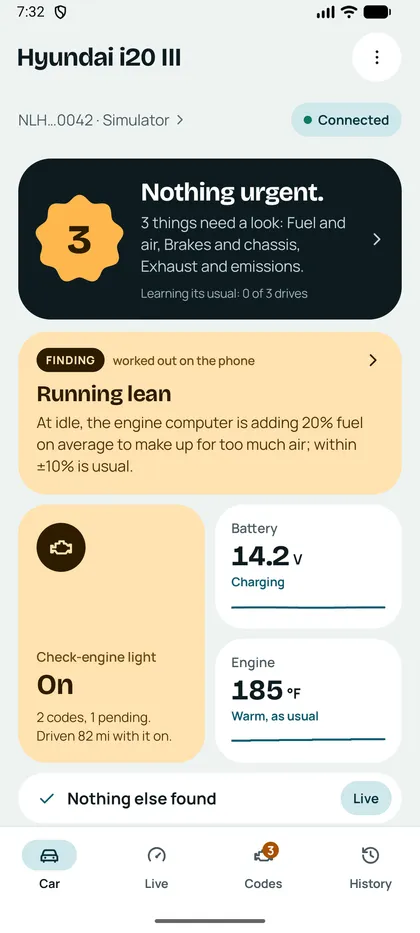
Hoodwise is an OBD2 diagnostic app for Android. Through an ELM327-compatible adapter plugged into the car’s diagnostic socket, it reads stored, pending and permanent trouble codes with their freeze frame, the readiness monitors, around 60 standard live values and, on many makes, the trouble codes of other modules such as ABS and airbags and values beyond standard OBD. An AI explanation, asked for with one tap, puts the codes and readings into plain words. Warnings about the live data — overheating, fuel trims, charging — are worked out on the phone, without AI. Hoodwise has no accounts; cars, scans and recordings stay on the phone.
How it works
-
1. Plug in the adapter
Any ELM327-compatible OBD2 adapter — Bluetooth, Bluetooth LE or Wi-Fi — into the socket under the steering wheel.
-
2. Ignition on, connect
The engine needn’t run. Hoodwise finds the adapter, reads the VIN and names the car.
-
3. Read what it found
An answer first — nothing urgent, or what needs a look — then the codes, the live data and, on a tap, the AI explanation.
What’s inside
-
Trouble codes
Stored, pending and permanent codes with descriptions, the freeze frame and the check-engine light; on 17 makes, ABS, airbags, gearbox, body computer and more as well.
-
Explain with AI
What the codes mean together, whether the car is fine to drive, the likely causes and what to check, quoting the readings it used.
-
Live data and graphs
Around 60 standard values with a graph on every tile; up to four values on one time axis, and recordings saved as CSV, also with the screen off.
-
Manufacturer values
Beyond standard OBD on over 20 makes: gearbox temperature, DPF soot, tyre pressures, misfires per cylinder, EV battery health — shown only when your car answers them.
-
Warnings on the phone
Overheating, fuel trims, charging and warm-up, and values that stray from your car’s own usual, worked out without AI.
-
Used-car check
Were the codes cleared lately to hide something before a sale? Readiness, distances since clearing and, where the car keeps them, odometers counted by other modules.
Who it’s for
Anyone with an OBD2 socket — most cars from 1996 in the US, petrol cars from 2001 and diesels from 2004 in the EU — and a cheap adapter.
-
Drivers with a warning light
Find out what the light means, and whether it can wait, before you go to the garage.
-
Used-car buyers
Check the car with the seller, and share the report.
-
DIY owners
Live data, freeze frames and fuel trims to confirm a repair worked.
-
Curious drivers
Watch what the engine does on a drive, and keep the recording.
Why an explanation, not just a code
A code like P0171 tells you which test failed, not what to do about it. Hoodwise reads everything around the code — the freeze frame, the fuel trims, the readiness tests, the other modules — and has AI put it together: what the codes mean as a group, how urgent they are and what to check first. The readings themselves come straight from the car, and every explanation says to have a mechanic confirm it.
Your scans stay on your phone
Hoodwise is built to send as little as an explanation needs.
- No account, no email, no sign-up.
- Cars, scans, recordings and logs live on your phone.
- A scan leaves it only when you ask the AI to explain it.
- Only the first 11 characters of the VIN go with it: the model, not your car.
- No ads, no analytics, no tracking.
Pricing
- Hoodwise is free: scanning, live data, graphs, recordings, the warnings and the used-car check, with no ads.
AI explanations come with a daily allowance per phone; asking again about the same scan doesn’t use it.
Questions
Which OBD2 adapter do I need?
Any ELM327-compatible adapter: Bluetooth, Bluetooth LE or Wi-Fi. No adapter yet? Try the demo car in the app first.
Will it work with my car?
If the car has an OBD2 socket, Hoodwise reads its engine codes and standard live data: most cars in the US since 1996, and in the EU petrol cars since 2001 and diesels since 2004. Other modules and manufacturer values depend on the make, and appear only when your car answers them.
What does the AI do, and what doesn’t it?
It explains: what the codes mean together, whether the car is fine to drive, likely causes and what to check. It doesn’t read the car — the codes and values come from the car itself — and it doesn’t replace a mechanic. The warnings about live data are worked out on the phone, without AI.
Can Hoodwise clear the check-engine light?
Yes, behind a confirmation. Clearing also resets the readiness monitors, and permanent codes stay until the car has checked the fault is gone — so fix the cause first.
How does the used-car check work?
Clearing codes resets the readiness monitors and the distance since clearing, and permanent codes can’t be cleared at all. Hoodwise reads all of them and tells you whether codes were cleared lately. Where the car keeps them, it also compares the odometer with distances other modules counted.
What leaves my phone?
Nothing, unless you ask for an AI explanation or report a value that doesn’t work. Then the scan goes to our server with the first 11 characters of the VIN, which name the model, not the car. No name, location or phone number is ever sent.
Is there an iPhone version?
Not yet. Hoodwise is coming to Android first.
Which languages does Hoodwise support?
English and Turkish, including the code descriptions and the AI explanations.
Support
Questions, a car that won’t connect or a value that looks wrong — email us and we reply within 30 days, usually much sooner.
Email support Privacy policy Terms of use
Hoodwise helps you understand your car; it doesn’t replace a qualified mechanic, and its AI explanations can be wrong. Don’t use the app while driving: let a passenger do it, or look once you’ve stopped.